4K Photo Booth Software for Ultra HD Webcams
Four times the pixels of 1080p — from a webcam you can buy today.
Sparkbooth 7 captures and previews in 4K, so an off-the-shelf Ultra HD webcam produces photo booth pictures sharp enough for large prints, not just screens. No DSLR, no capture card, no rental contract — plug in the camera, raise one slider, and start shooting.
Free 30-day no obligation trial. Photos are watermarked during trial.
For Premium, Windows 10 or later, Mac OS 13.7 or later, Webcam, 4GB or more RAM, and i3 processor or better (2.0 Ghz or faster) recommended.
Why 4K Changes What Your Booth Can Print
Print quality is arithmetic. A 1080p webcam gives you a 1920 × 1080 image — about 2 megapixels. At the 300 DPI print shops ask for, that is roughly a 6.4″ × 3.6″ photo before you crop anything. A 4K webcam gives you 3840 × 2160, about 8 megapixels, or roughly 12.8″ × 7.2″ at the same density.
Room to Crop
Portrait layouts, 2″ × 6″ strips and duplicate-strip templates all throw away part of a widescreen frame. Starting at 4K means the crop still lands well above print resolution instead of turning soft.
Sharper Live View
4K works for the on-screen preview too, not only the saved photo. Guests see a crisp, full-size mirror of themselves while they pose — which is most of what makes a booth feel premium.
Better Green Screen

More pixels along the edge of hair and shoulders means a cleaner key. Green screen replacement holds up far better at 4K than it does at 720p or 1080p.
Turning On 4K Takes About Ten Seconds
- Install or update to the latest Sparkbooth 7 release.
- Connect your 4K webcam and open the camera settings.
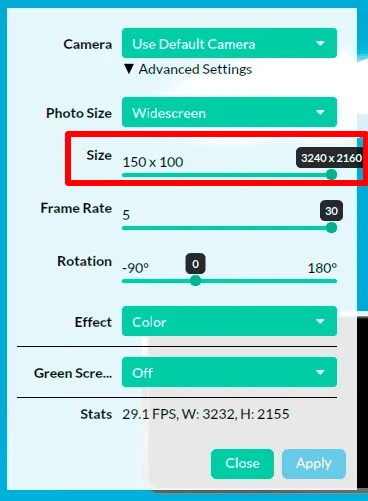
- Expand Advanced Settings and drag the Size slider up to your webcam's 4K resolution.
That is the whole setup. Everything downstream — layouts, overlays, printing, email, SMS, QR code sharing, uploads — keeps working exactly as before, just at higher resolution.
Which 4K Webcam Should You Buy?
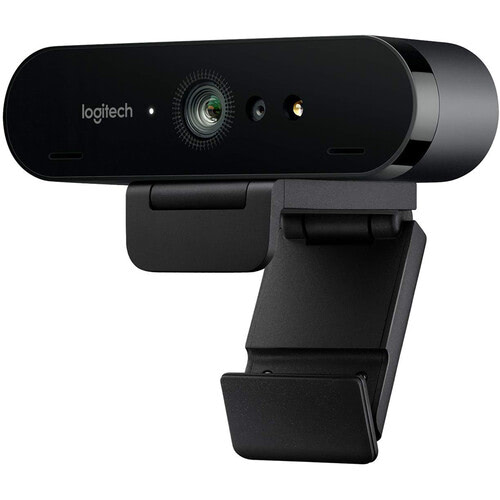
We run and recommend the Logitech Brio. It shoots 4K Ultra HD, handles mixed venue lighting with HDR and automatic light correction, autofocuses reliably, and lets you pick a field of view — which matters when your booth has to fit a group of six into a narrow corner.
Any webcam that reports a 4K mode will show up in the Size slider, so you are not locked to one brand. If you are still shopping, our recommended webcam guide covers the trade-offs.
A 4K Booth Is Still a Full Sparkbooth
Drag-and-Drop Layout Editor
Build strips, 4″ × 6″ prints and custom keepsakes visually, then brand them with the client's logo. See the layout editor.
Animated GIFs and Boomerangs
Turn the same session into a looping GIF, boomerang or rewind clip with static or animated overlays. See GIF booth mode.
Email, Text and Share
Send photos to guests by email or SMS through your own provider, or hand them a QR code. Works online, and queues up when the venue Wi-Fi does not.
Touchscreen Signing and Props
Guests sign, draw and drag virtual props onto their own photos with a touchscreen or mouse. Add your own images as stickers.
4K Webcam or DSLR?
A 4K webcam is the right call when you want one cable, a small footprint and a low equipment bill — and it prints far better than the 1080p booths most people are competing with. Step up to Sparkbooth DSLR when you need shallow depth of field, strobe or flash sync, and clean images in a dim reception hall. Same software, same layouts; the DSLR license simply adds Canon, Nikon and Sony camera support on top of everything here.
- Webcams, including 4K
- Lifetime license, 3 activations
- Commercial and business use
- Free updates within version 7
- Windows and macOS
- Everything in Premium
- Canon, Nikon and Sony cameras
- Lifetime license, 3 activations
- Commercial and business use
- Windows and macOS
Lifetime, non-expiring license — not a subscription. Not sure yet? Try the full app free for 30 days — no credit card, no obligation. Trial photos are watermarked. See the full feature comparison or upgrade an older license.
4K Photo Booth Questions
What version of Sparkbooth do I need for 4K?
The latest Sparkbooth 7 release. If you already own a version 7 license, the update is free — just download the current build and your key keeps working.
Does 4K work for both the photo and the live preview?
Yes. 4K support covers photo capture and live view, so guests see the high-resolution preview while they pose and the saved file matches it.
Do I need a fast computer to run a 4K photo booth?
Our published recommendation is 4GB or more of RAM and an i3 processor or better at 2.0 GHz or faster for webcam booths. 4K frames are larger than 1080p frames, so if you are running a high-volume event we suggest testing your exact machine, camera and layout together before the first booking — that is what the free 30-day trial is for.
Which webcam do you recommend?
The Logitech Brio. Any webcam that advertises a 4K mode to the operating system will appear in Sparkbooth's Size slider.
Is 4K included in the license or is it an add-on?
It is included. There is no 4K upcharge, no per-event fee and no subscription — Sparkbooth licenses are one-time and non-expiring.
Can I use a 4K webcam for commercial events?
Yes. Both Premium and DSLR licenses allow commercial and business use, and each license includes 3 activations. If you are building a rental company, start with our guide to starting a photo booth business.
Shoot Your Next Event in 4K
Download the full app, point it at your webcam, and see the difference on the first print.
Free 30-day no obligation trial. Photos are watermarked during trial.
Explore Sparkbooth
Webcam Photo Booth · DSLR Photo Booth · Mirror Booth · AI Photo Booth · Start a Photo Booth Business
GIF Photo Booth · Photo Kiosk · Layout Editor · Photo Booth for Events · Wedding Photo Booth