In time for your New Years Eve party, a maintenance update for Sparkbooth. Changes include:
- Add help links to some settings
- Backup single photo to sparkbooth-photo folder if current save folder is unavailable
In time for your New Years Eve party, a maintenance update for Sparkbooth. Changes include:
Mostly a maintenance update. Changes include:

The thought of hosting as well as attending a holiday party is both fun and exciting! The holiday spirit is in the air as some of the top holidays - Thanksgiving, Christmas, and New Year's Eve - are quickly approaching. This means that everyone is eager to either throw or attend one of the many holiday parties that will occur during this especially festive season.
One exceptionally unique way to commemorate a holiday party is to include a photo booth! This way you are able to take a lot of fun photos throughout the party, as well as allow all guests to take home a photo souvenir that will remind them of all the fun they had, and are sure to have again come next holiday season.
Although renting a photo booth is one idea, a more affordable and easier to manage idea is to use Sparkbooth! Sparkbooth is a great idea for taking photos since there are a variety of ways to use the Sparkbooth software. You'll receive more options when it comes to creating these fun photos, as well being able to use it again and again throughout the years for both future home and office parties. All you need is a computer, a webcam, and a printer and you're ready to go!

Home Holiday Parties. Most families are likely to host a holiday party so that all family members are able to come together and enjoy each other's company at this special time of year. A great way to add to the holiday celebration is to include a way for everyone to take a photo of themselves with their family. These photos are special and can be quite the keepsake, reminding everyone of just how much fun they had attending the home holiday party.
Create a Holiday Card that you can send out to friends and family by choosing one of the many holiday themes from the Sparkbooth layout library. Or make your own and add a personalized message!
Office Holiday Parties. Most companies tend to hold an office holiday party during this joyful time of year. Guests are sure to enjoy all the delicious holiday foods that will be served, as well as the a variety of music that will be playing throughout the celebration. But if you really want to take the office party to another whole level, give guests the ability to take holiday photos of themselves along with their co-workers! These holiday photos should not only be placed around the office for all to see and enjoy, everyone should be able to take at least one photo home with them as a souvenir of their office holiday party fun!
Using props when you are taking a photo can be both entertaining and amusing!
Thanksgiving

Incorporate a few Thanksgiving props while taking the photos for a real Thanksgiving Holiday feel. Be formal or be silly, it's up to you!
Christmas

Buy (or if you're really crafty!) make a few Christmas Props that will make taking the photo booth pictures unique and fun.
New Years Eve
Use number cutouts and hold them up one at a time while taking a 4-photo strip so that the finished 4-strip photo shows the date of the New Year.
Thanksgiving
Consider a Fall (seasonal) background, a turkey background, or a Thanksgiving Feast background.
Christmas
Lots of choices for using a Christmas theme as the holiday background! Consider a Christmas Tree, colorful presents, or snow falling, just to name a few of the more popular choices.
New Years Eve
The New York Eve's famous ball drop is a popular background, as well as silver/gold stars/fireworks/ribbons, and party favors.
There are many features and benefits to be had when you choose to use Sparkbooth at your next holiday party, so be sure to follow the Sparkbooth setup tips in order to make sure that all photos come out perfect every time. Also, you can upload photos to Twitter in order to immediately share the fun and laughter with all those that are close to you. Have Fun!!
Sparkbooth 3.0.10 preview update is now available. This update includes the new Facebook Guest uploader which will upload photos into your guest's Facebook account. Guests will be prompted for permission to upload into their Facebook account for each photo session.
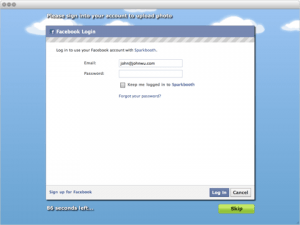
Other changes include centering of on-screen messages when video screen is not displayed.
Download SparkboothChanges include:
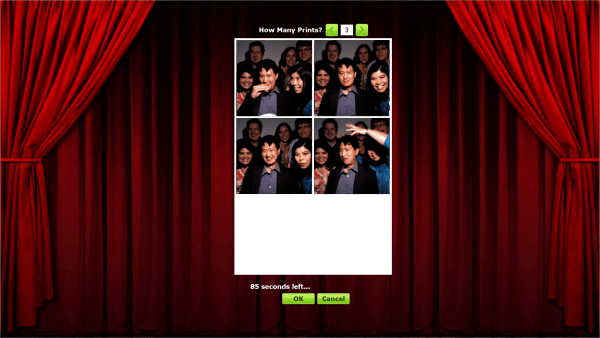
Just in time for your Halloween party! This update adds the ability for guests to select the number of print copies. To turn this new option:
Sparkbooth 2.6.7 update is now available for download. Changes include:
Sparkbooth 3.0.7 preview update is now also available on the download page. This update includes all changes above plus all Sparkbooth 3 preview features and...
Your Sparkbooth license key will also unlock this version. If you have a Sparkbooth Party Edition license key, please contact me about upgrading pricing if you want to unlock Sparkbooth 3.
Download SparkboothThis update includes:
Starting Oct 1, 2011, Facebook is requiring all applications to use OAuth 2.0 for their APIs. If you are using the Facebook uploader, please update to this version in order to continue to upload photos to Facebook.
Download SparkboothThis update includes:
The previous changes and features for Sparkbooth 3:
This preview does not include the Canon camera or the native webcam features. These are still under development, but feel free to email me if you want to try it. If you want to use your Canon camera, please read the instructions carefully to get access.
You can use your Sparkbooth license to activate this preview. If you have a Sparkbooth Party Edition license, I will be offering an upgrade to Sparkbooth which will allow you to get Sparkbooth 3. Details coming soon, or please email me if you can't wait.
Download Sparkbooth