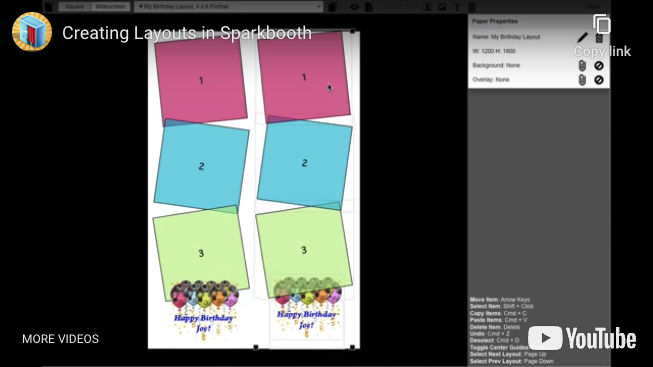
t
Click to play demo video

Sparkbooth Layout Editor

Included with every Sparkbooth Premium and Sparkbooth DSLR license — not a paid add-on.

Use the visual drag-and-drop layout editor to create or customize photo layouts and templates for a truly customized event experience.

Every Premium and DSLR license includes the editor and Sparkbooth's library of ready-made layouts to customize. Arrange photo placeholders, drop in your own images and text, and save the result as a template for the next event.

What You Can Build

The editor works on a canvas the size of the finished print. Drag photo placeholders where you want them, layer your own artwork above and below, and preview with sample photos before the event.

Strips and 4″ × 6″ Prints

Classic 2″ × 6″ strips, full 4″ × 6″ prints and duplicate-strip templates that put two identical strips on one 4″ × 6″ sheet for cutting. Any number of photos per layout.

Backgrounds, Overlays and Logos

Add a background image, a foreground overlay and the client's logo, then add text in any font — the couple's names, the date, a hashtag or a sponsor line.

Every Booth Mode

One layout works everywhere: a webcam booth, a Canon, Nikon or Sony camera, a mirror booth or the printed keepsake from a GIF booth session.

The Layout Editor Is Included in Both Licenses

The editor and the layout library are part of Sparkbooth Premium and Sparkbooth DSLR — a one-time, non-expiring license with three activations and commercial use included. No template packs to buy, no monthly fee and no charge per event.

Premium
$149 USD
one-time purchase
  • Webcams, including 4K
  • Lifetime license, 3 activations
  • Commercial and business use
  • Free updates within version 7
  • Windows and macOS
Buy Premium
DSLR
$189 USD
one-time purchase
  • Everything in Premium
  • Canon, Nikon and Sony cameras
  • Lifetime license, 3 activations
  • Commercial and business use
  • Windows and macOS
Buy DSLR

Lifetime, non-expiring license — not a subscription. Not sure yet? Try the full app free for 30 days — no credit card, no obligation. Trial photos are watermarked. See the full feature comparison or upgrade an older license.

Layout Editor Questions

Do I have to design layouts from scratch?

No. Sparkbooth ships with a library of ready-made strip and print layouts. Open one in the editor, swap the background, add a logo or text, and save it as your own. Start from a blank canvas only when you want something completely different.

Can I brand layouts per client?

Yes. Each layout is saved separately, so you can keep one per client or event with their logo, colours and wording, and switch between them in a few seconds before the booth opens.